
How to calculate food cost
Food cost is the share of a dish's selling price that goes to ingredients, usually given as a percentage: the food cost percentage. It is the simplest way to see whether your menu pays its way. Below are the food cost formula, the usual traps and a full worked example.
1. The food cost formula
A dish's cost is the cost of all ingredients in one portion. To calculate the food cost percentage, divide that cost by the net selling price:
Whatever is left of the net price after ingredients is your gross margin (called simply “margin” in the app):
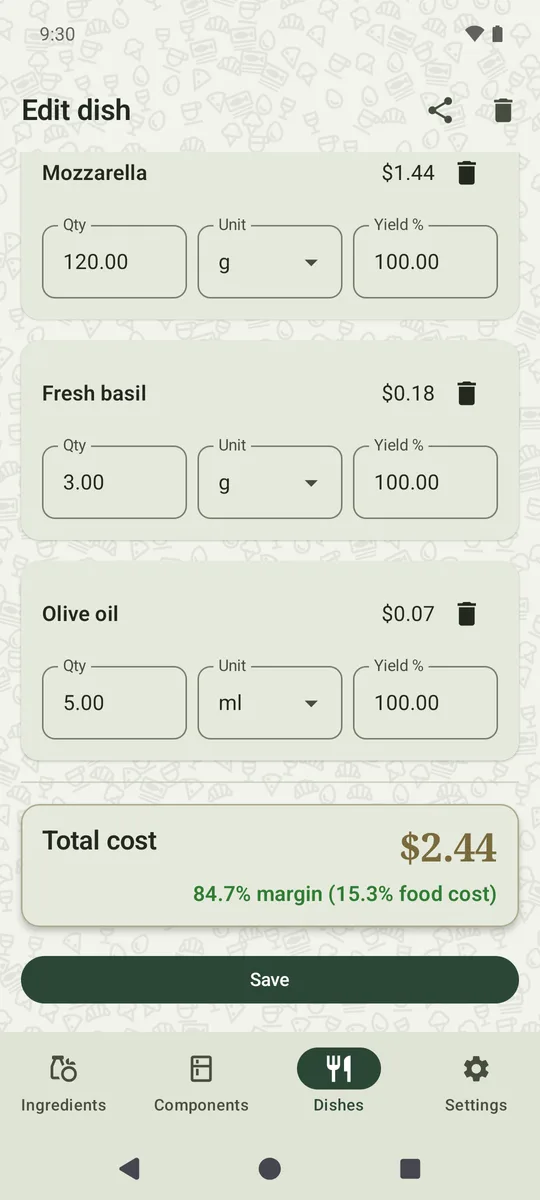
Example: a Margherita costs $2.44 in ingredients and sells for $16.00. Food cost is 2.44 ÷ 16.00 = 15.3%, so the margin is 84.7%.
2. Use the net price
Where menu prices include VAT, as in most of Europe, the tax is not your revenue: you pass it on to the tax office. Remove it before calculating food cost:
Skipping this step makes every dish look better than it is. With a portion cost of 16.30, that dish shows 47.9% food cost against the menu price, but the real figure is 51.8%.
In the US and other markets where menu prices are shown before sales tax, there is nothing to remove: set the VAT rate to 0 in the app's Settings. Enter ingredient prices net of any tax you can reclaim.
3. Yield and waste
You buy onions with skins and serve them peeled. You buy ground beef and the cooked patty weighs less. Yield is the share of what you buy that ends up usable:
Cost the quantity you buy, not the quantity on the plate. Leave yield out and every dish looks cheaper than it really is.
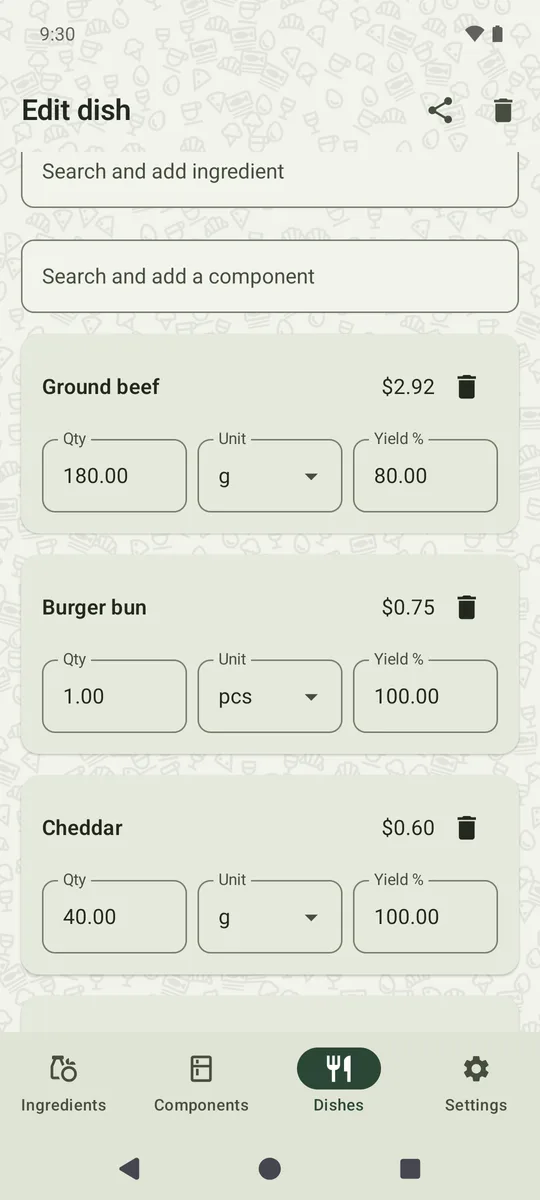
In the app you enter the net quantity on each recipe line plus a yield %. In the screenshot, a 180 g patty at 80% yield needs 225 g of beef: $2.92 instead of $2.34.
Measure yields in your own kitchen: weigh the product before and after prep, and divide the second weight by the first.
4. Prep components
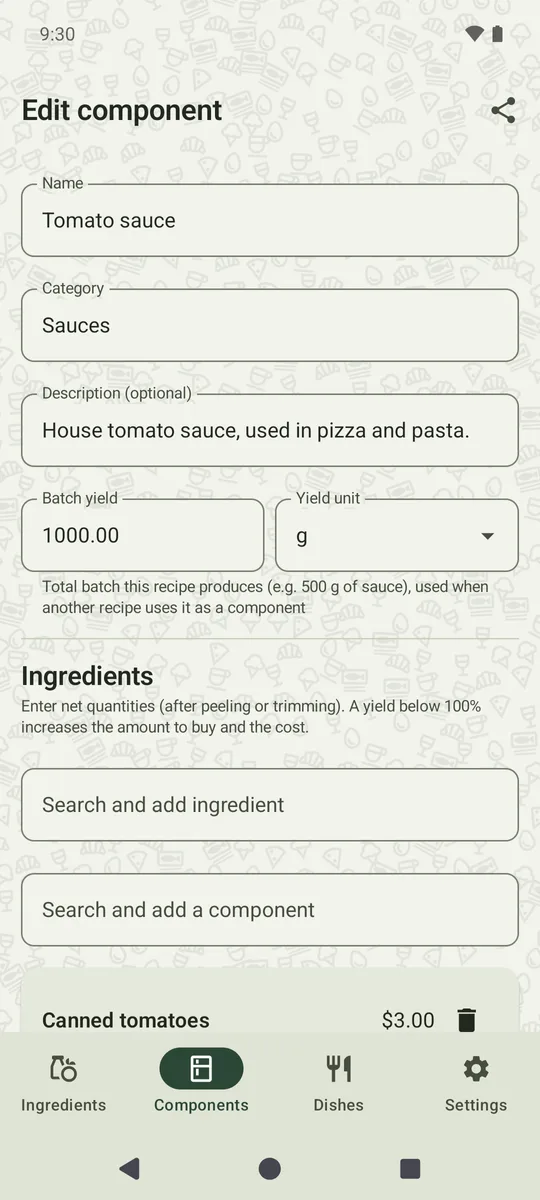
Sauces, doughs and stocks are made in batches and used by the portion. Cost the whole batch, then divide by how much it yields:
A component in the app has a “Batch yield” field. Change the price of canned tomatoes and the sauce cost updates, along with every dish that uses the sauce.
5. Margin vs. markup
These two are often confused, yet they give very different numbers:
- Margin is based on the price: (net price − cost) ÷ net price.
- Markup is based on the cost: (net price − cost) ÷ cost.
A dish costing $3 and selling for $10 has a 70% margin but a 233% markup. Margin can never exceed 100%; markup can. Food Cost Calculator shows margin, because margin and food cost always add up to 100%.
6. Worked example: an underpriced cheeseburger
A cheeseburger with fries is on the menu at $11.00. It feels fairly priced. Let's check:
| Ingredient | Net qty | Yield | To buy | Cost |
|---|---|---|---|---|
| Ground beef ($13.00/kg) | 180 g | 80% | 225 g | $2.92 |
| Burger bun ($0.75 each) | 1 pc | 100% | 1 pc | $0.75 |
| Cheddar ($15.00/kg) | 40 g | 100% | 40 g | $0.60 |
| Lettuce ($2.50 a head ≈ 300 g) | 30 g | 75% | 40 g | $0.33 |
| Tomato ($5.00/kg) | 40 g | 90% | 44 g | $0.22 |
| French fries (component, $2.91 per 700 g) | 200 g | 100% | 200 g | $0.83 |
| Portion cost | $5.66 | |||
Amounts are rounded to the cent; the total is calculated from exact values, as in the app.
Food cost is 5.66 ÷ 11.00 = 51.5%, leaving a margin of only 48.5%. With the default 50% warning threshold, the app flags this dish red.
How to fix it
You have two levers: price and cost. To find the price for a target food cost, turn the formula around:
| Target food cost | Menu price |
|---|---|
| 30% (70% margin) | $18.88 |
| 35% (65% margin) | $16.18 |
| 40% (60% margin) | $14.16 |
A $19 burger is a hard sell, so combine both levers. A smaller patty (150 g instead of 180 g) and a smaller side of fries (150 g instead of 200 g) bring the cost down to $4.97. At a new price of $14.00, food cost drops to 35.5%: the rating moves from Poor to Warning, and guests still get a generous plate.
In the app you can try such variants on the spot: change a quantity or the price, and the cost, food cost and color rating update immediately, even before you save.
7. What is a good food cost percentage?
Industry guides most often quote a range of about 25–35% of net food sales. Treat it as a rule of thumb, not a standard:
- Pizza, pasta and dishes built on inexpensive staples usually run lower and can balance out pricier items.
- Steak, fish and seafood run higher, but often earn more money per plate.
- A venue with high rent or a large team needs a lower food cost than a small owner-run bistro.
So look at the whole menu, not just one percentage. In the app you set your own thresholds: a target (70% margin by default, i.e. 30% food cost) and a warning level (50% margin by default). The dish list shows the average margin of your menu and how many dishes fall into each color.
Food cost from recipes is a theoretical figure. Actual cost from stock counts is usually higher because of waste, over-portioning and staff meals. If the gap is large, check portion sizes and yields first.
Cost your own menu
Food Cost Calculator does these calculations for you: offline, no account, in your currency.
See what's in Free and Pro